# Filament FullCalendar
[](https://packagist.org/packages/saade/filament-fullcalendar)
[](https://packagist.org/packages/saade/filament-fullcalendar)
# Features
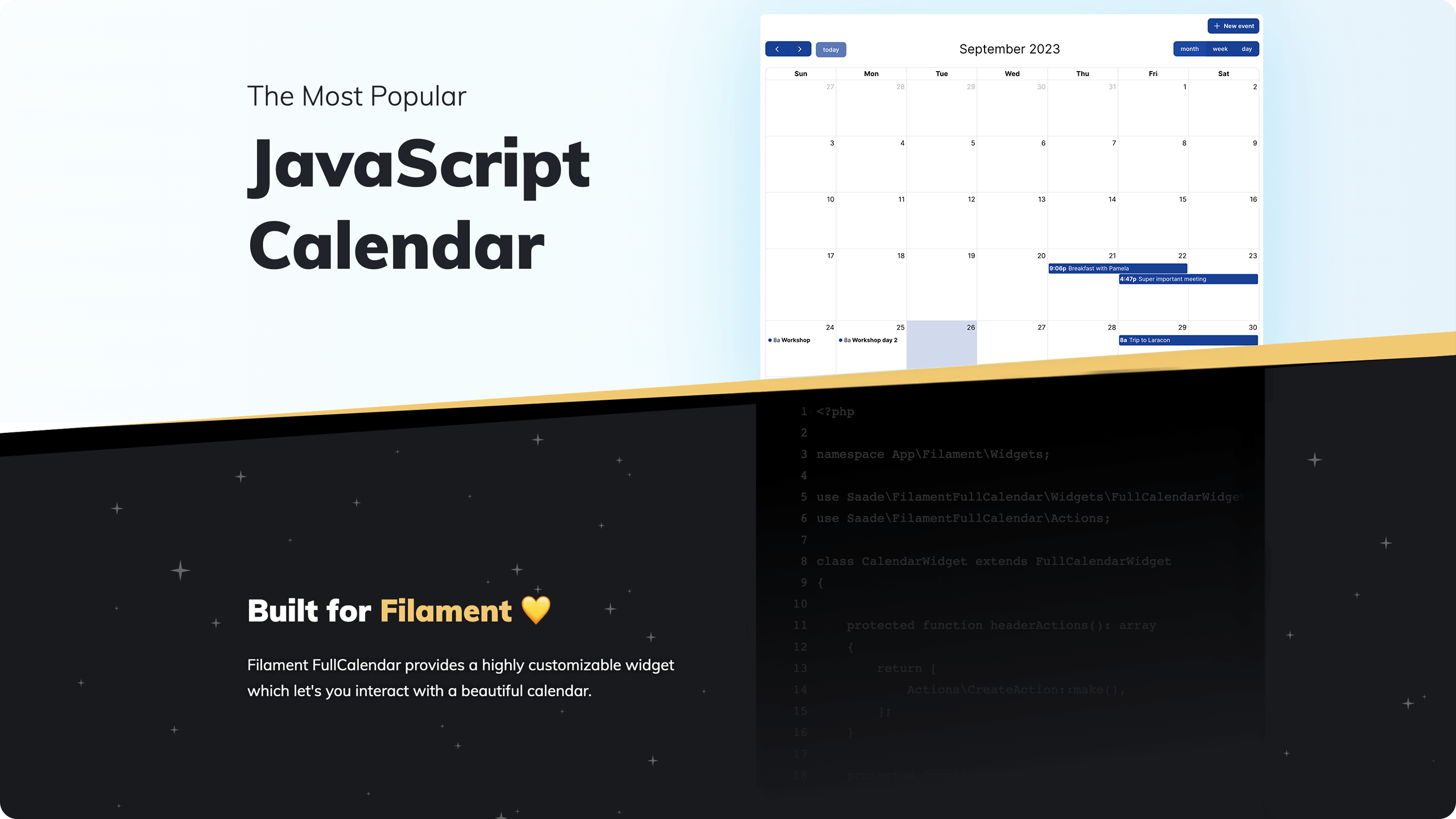
- Highly customizable
- Modals for viewing, creating, editing and deleteing events Powered by Filament Actions
- Filament-y theme
- and much more!
# Table of contents
- [Filament FullCalendar](#filament-fullcalendar)
- [Features](#features)
- [Table of contents](#table-of-contents)
- [Installation](#installation)
- [Usage](#usage)
- [Returning events](#returning-events)
- [The EventData class](#the-eventdata-class)
- [Configuration](#configuration)
- [Available methods](#available-methods)
- [schedulerLicenseKey(`string` | `null` $licenseKey)](#schedulerlicensekeystring--null-licensekey)
- [selectable(`bool` $selectable)](#selectablebool-selectable)
- [editable(`bool` $editable)](#editablebool-editable)
- [timezone(`string` | `null` $timezone)](#timezonestring--null-timezone)
- [locale(`string` | `null` $locale)](#localestring--null-locale)
- [plugins(`array` $plugins, `bool` $merge)](#pluginsarray-plugins-bool-merge)
- [config(`array` $config)](#configarray-config)
- [Interacting with actions](#interacting-with-actions)
- [Customizing actions](#customizing-actions)
- [Authorizing actions](#authorizing-actions)
- [Intercepting events](#intercepting-events)
- [Render Hooks](#render-hooks)
- [Tricks](#tricks)
- [Editing event after drag and drop](#editing-event-after-drag-and-drop)
- [Creating events on day selection](#creating-events-on-day-selection)
- [Creating events with additional data](#creating-events-with-additional-data)
- [Event tooltip on hover](#event-tooltip-on-hover)
- [Adding the widget to a Blade view](#adding-the-widget-to-a-blade-view)
- [Share your tricks](#share-your-tricks)
- [Changelog](#changelog)
- [Contributing](#contributing)
- [Security Vulnerabilities](#security-vulnerabilities)
- [Credits](#credits)
- [License](#license)
# Installation
You can install the package via composer:
```bash
composer require saade/filament-fullcalendar:^3.0
```
# Usage
1. First, create a [Filament Widget](https://filamentadmin.com/docs/2.x/admin/dashboard#getting-started):
```bash
php artisan make:filament-widget CalendarWidget
```
> This will create a new widget class in your project.
1. Your newly created widget should extends the `Saade\FilamentFullCalendar\Widgets\FullCalendarWidget` class of this package
> **Warning**
>
> Don't forget to remove `protected static string $view` from the generated class!
Your widget should look like this:
```php
where('starts_at', '>=', $fetchInfo['start'])
->where('ends_at', '<=', $fetchInfo['end'])
->get()
->map(
fn (Event $event) => [
'title' => $event->id,
'start' => $event->starts_at,
'end' => $event->ends_at,
'url' => EventResource::getUrl(name: 'view', parameters: ['record' => $event]),
'shouldOpenUrlInNewTab' => true
]
)
->all();
}
}
```
## The EventData class
If you want a fluent way to return events, you can use the `Saade\FilamentFullCalendar\Data\EventData` class.
```php
where('starts_at', '>=', $fetchInfo['start'])
->where('ends_at', '<=', $fetchInfo['end'])
->get()
->map(
fn (Event $event) => EventData::make()
->id($event->uuid)
->title($event->name)
->start($event->starts_at)
->end($event->ends_at)
->url(
url: EventResource::getUrl(name: 'view', parameters: ['record' => $event]),
shouldOpenUrlInNewTab: true
)
)
->all();
}
}
```
# Configuration
Before you can configure the calendar, you'll need to add `FilamentFullcalendarPlugin` to your panel's `plugins` array.
```php
default()
->id('admin')
->path('admin')
...
->plugin(
FilamentFullCalendarPlugin::make()
->schedulerLicenseKey()
->selectable()
->editable()
->timezone()
->locale()
->plugins()
->config()
);
}
}
```
```php
1,
'headerToolbar' => [
'left' => 'dayGridWeek,dayGridDay',
'center' => 'title',
'right' => 'prev,next today',
],
];
}
}
```
## Available methods
### schedulerLicenseKey(`string` | `null` $licenseKey)
Your [FullCalendar Premium License Key](https://fullcalendar.io/docs/premium). (Only required if you're using premium plugins)
`licenceKey` (Default: `null`)
### selectable(`bool` $selectable)
Allows a user to highlight multiple days or timeslots by clicking and dragging. See: [selectable](https://fullcalendar.io/docs/selectable)
`selectable` (Default: `false`)
### editable(`bool` $editable)
This determines if the events can be dragged and resized. See: [editable](https://fullcalendar.io/docs/editable)
`editable` (Default: `false`)
### timezone(`string` | `null` $timezone)
The timezone to use when displaying dates. See: [timezone](https://fullcalendar.io/docs/timeZone)
`timezone` (Default: `config('app.timezone')`)
### locale(`string` | `null` $locale)
The locale to use when displaying texts and dates. See: [locale](https://fullcalendar.io/docs/locale)
`locale` (Default: `config('app.locale')`)
### plugins(`array` $plugins, `bool` $merge)
The plugins to enable. You can add more plugins if you wish, or replace the default ones by passing `false` as the second param for the method. See: [plugins](https://fullcalendar.io/docs/plugin-index)
`plugins` Default: `['dayGrid', 'timeGrid']`
`merge` Default: `true`
### config(`array` $config)
The configuration of the calendar. Not all configurations have a dedicated fluent method to interact with it, therefore you can pass pretty much any configuration listed in the FullCalendar's TOC. See: [FullCalendar Docs](https://fullcalendar.io/docs#toc)
`config` (Default: `[]`)
# Interacting with actions
This packages leverages the power of [Filament Actions](https://filamentphp.com/docs/3.x/actions/overview) to allow you to view, create, edit and delete events.
To get started, you'll need to tell the widget which model it should use to perform the actions, and define a form schema for the view, create and edit actions.
```php
schema([
Forms\Components\DateTimePicker::make('starts_at'),
Forms\Components\DateTimePicker::make('ends_at'),
]),
];
}
}
```
> **Note**
> Please note that the form schema does not need to contain the same fields as the FullCalendar event object. You can add as many fields as your model has.
That's it! Now you can view, create, edit and delete events.
### Customizing actions
If you want to customize the actions, you can override the default actions that comes with this package. Actions behaves like any other Filament Action, therefore you can customize them as you wish the same way you would customize any other Filament Action.
```php
schema([
Forms\Components\DateTimePicker::make('starts_at'),
Forms\Components\DateTimePicker::make('ends_at'),
]),
];
}
}
```
### Authorizing actions
Action authorization behaves like any other Filament Action, therefore you can customize them as you wish the same way you would customize any other Filament Action.
# Intercepting events
If you want to intercept events, you can override the default methods that comes with this package.
> **Warning**
> If you override any of the methods below, you'll need to call the parent method to keep the calendar working as expected.
See the [InteractsWithEvents](https://github.com/saade/filament-fullcalendar/blob/3.x/src/Widgets/Concerns/InteractsWithEvents.php) for all the available event listeners.
# Render Hooks
If you want to customize the calendar's event rendering, you can use Fullcalendar's built in [Render Hooks](https://fullcalendar.io/docs/event-render-hooks) for that. All the hooks are supported.
Here's an example of how you can use the `eventDidMount` hook to add a custom implementation:
```php
public function eventDidMount(): string
{
return <<
# Tricks
## Editing event after drag and drop
You can fill the form with the event's new data by using the `mountUsing` method on the `EditAction`.
```php
protected function modalActions(): array
{
return [
Actions\EditAction::make()
->mountUsing(
function (Event $record, Forms\Form $form, array $arguments) {
$form->fill([
'name' => $record->name,
'starts_at' => $arguments['event']['start'] ?? $record->starts_at,
'ends_at' => $arguments['event']['end'] ?? $record->ends_at
]);
}
),
Actions\DeleteAction::make(),
];
}
```
## Creating events on day selection
You can fill the form with the selected day's date by using the `mountUsing` method on the `CreateAction`.
```php
use Saade\FilamentFullCalendar\Actions\CreateAction;
protected function headerActions(): array
{
return [
Actions\CreateAction::make()
->mountUsing(
function (Forms\Form $form, array $arguments) {
$form->fill([
'starts_at' => $arguments['start'] ?? null,
'ends_at' => $arguments['end'] ?? null
]);
}
)
];
}
```
## Creating events with additional data
You can add additional data to the event by using the `mutateFormDataUsing` method on the `CreateAction`.
```php
protected function headerActions(): array
{
return [
Actions\CreateAction::make()
->mutateFormDataUsing(function (array $data): array {
return [
...$data,
'calendar_id' => $this->record->id
];
})
];
}
```
## Event tooltip on hover
You can add a tooltip to fully show the event title when the user hovers over the event via JavaScript on the `eventDidMount` method:
```php
public function eventDidMount(): string
{
return <<
# Changelog
Please see [CHANGELOG](CHANGELOG.md) for more information on what has changed recently.
# Contributing
Please see [CONTRIBUTING](.github/CONTRIBUTING.md) for details.
# Security Vulnerabilities
Please review [our security policy](../../security/policy) on how to report security vulnerabilities.
# Credits
- [Saade](https://github.com/saade)
- [All Contributors](../../contributors)
# License
The MIT License (MIT). Please see [License File](LICENSE.md) for more information.